


Why Is My Phone Camera Blurry All of a Sudden?
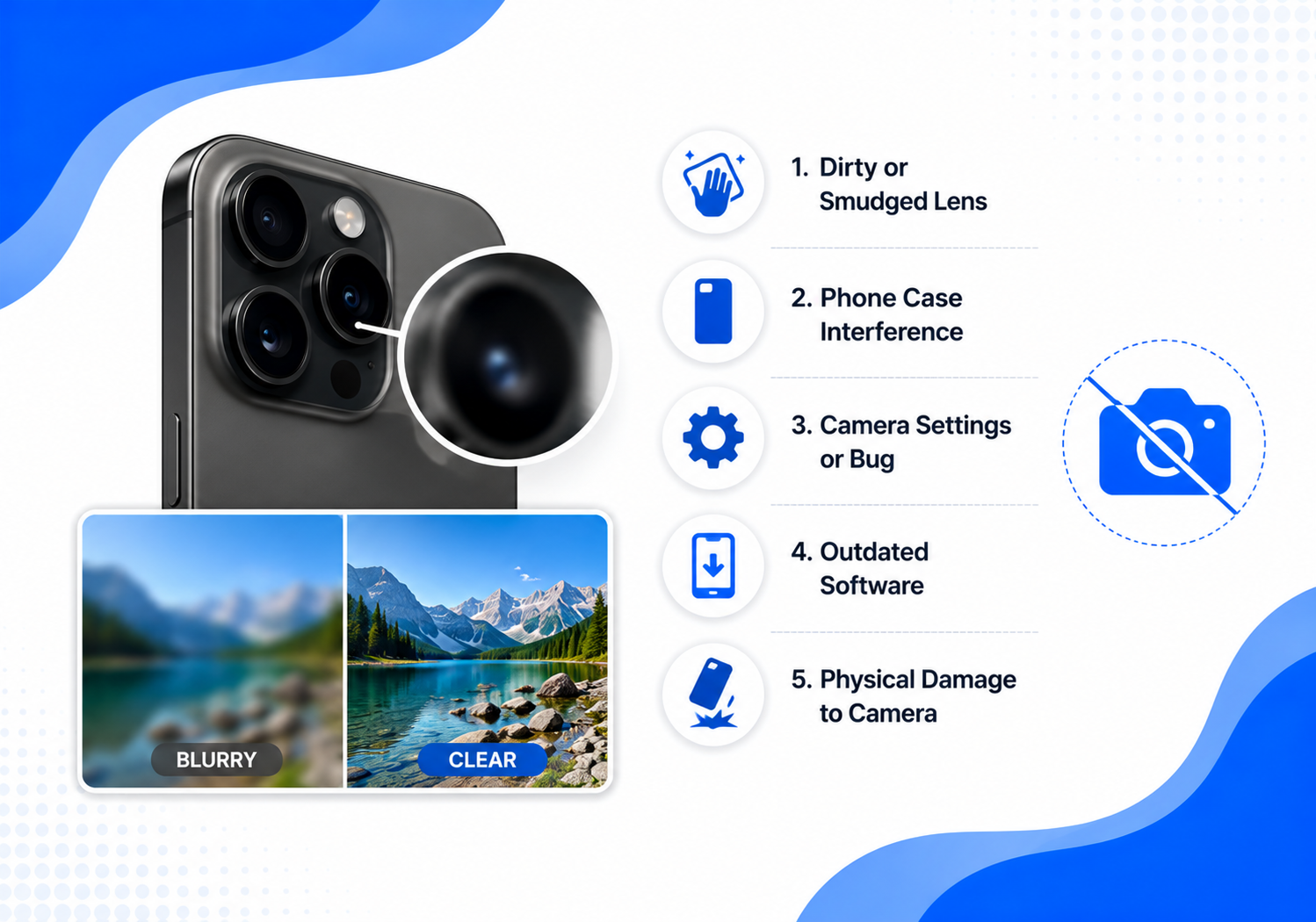
Camera blurry সাধারণত এর কারণ খুব বড় কোনো fault নয়। Lens-এর ওপর fingerprint, ভুল focusing distance, low light, phone case বা camera lens protector-এর interference, temporary software glitch কিংবা phone পড়ে যাওয়ার পর camera module damage—এসবের যেকোনো একটি থেকে সমস্যাটি শুরু হতে পারে।
তাই নতুন phone কেনা অথবা repair shop-এ যাওয়ার আগে নিচের troubleshooting steps গুলো order অনুযায়ী follow করুন।
Quick Answer: Why Is My Phone Camera Blurry All of a Sudden?
আপনার phone camera suddenly blurry হলে প্রথমে lens পরিষ্কার করুন, case ও lens protector খুলে test করুন এবং screen-এ subject-এর ওপর tap to focus করুন। এরপর Camera app এবং phone restart করুন।
Bright daylight-এ 1x camera দিয়ে একটি test photo তুলুন। এতে বোঝা যাবে issueটি lighting, accessory, camera app নাকি hardware-related।
Apple blurry photo হলে front ও rear camera lens microfiber cloth দিয়ে পরিষ্কার করা, magnetic accessory সরানো, device restart করা এবং software update করার পরামর্শ দেয়। Samsung-এর guidance অনুযায়ী poor lighting, subject movement এবং খুব কাছে থেকে ছবি তোলাও focus ও sharpness নষ্ট করতে পারে।
Why the Camera Suddenly Becomes Blurry
1. Dirty Camera Lens or Fingerprint
Pocket, হাতের oil, makeup এবং dust মিলিয়ে একটি dirty camera lens তৈরি হতে খুব বেশি সময় লাগে না। Lens দেখতে পরিষ্কার মনে হলেও thin oily film-এর কারণে photo soft, foggy বা washed out দেখাতে পারে।
এই অবস্থায় আপনার মনে হতে পারে camera quality suddenly bad অথবা phone camera hazy, অথচ কয়েক সেকেন্ডের cleaning-এই সমস্যাটি চলে যেতে পারে।
2. Camera Autofocus Issue
একটি camera autofocus issue হলে preview বারবার sharp থেকে blurry হয়। কখনো foreground clear থাকে, কিন্তু মূল subject blur দেখা যায়।
Subject-এর ওপর tap করুন এবং camera-কে focus lock করার জন্য এক মুহূর্ত সময় দিন। খুব কাছে থাকলে একটু পিছিয়ে যান। Samsung জানিয়েছে, subject খুব কাছে থাকলে phone camera ঠিকভাবে focus করতে না-ও পারে এবং বিভিন্ন lens-এর minimum focusing distance আলাদা হতে পারে।
3. Low Light and Movement
Low light photography-তে phone camera যথেষ্ট light সংগ্রহ করার চেষ্টা করে। এই সময় হাত বা subject সামান্য নড়লেও motion blur তৈরি হতে পারে।
Mobile-camera research অনুযায়ী low-light condition এবং fast-moving subject একসঙ্গে থাকলে smartphone photo-তে motion blur তৈরি হওয়া একটি পরিচিত সমস্যা।
4. Digital Zoom or Wrong Camera Lens
High digital zoom image crop করে, যার কারণে details soft বা pixelated দেখাতে পারে। আবার 0.5x, 1x এবং telephoto camera-এর focusing distance এক নয়।
তাই phone camera blurry when zooming হলে excessive pinch zoom বাদ দিয়ে phone-এর native zoom levels—যেমন 1x, 2x বা 3x—ব্যবহার করুন।
5. Phone Case or Lens Protector Interference
Cheap, scratched, dusty অথবা misaligned camera lens protector photo-তে flare, haze এবং edge blur তৈরি করতে পারে। Thick case camera opening আংশিক block করলেও camera lens blurry মনে হতে পারে।
Apple এবং Xiaomi উভয়েই case, film, magnetic accessory অথবা lens protector খুলে camera test করার পরামর্শ দেয়।
6. Camera App or Software Glitch
Camera app freeze, corrupted camera app cache, recent update অথবা third-party app conflict থেকে software update camera issue দেখা দিতে পারে।
Xiaomi built-in Camera app দিয়ে test করার পরামর্শ দেয়, কারণ কিছু third-party app image compress করতে পারে অথবা optimized camera API ব্যবহার না-ও করতে পারে। Samsung Safe Mode ব্যবহার করে downloaded app conflict শনাক্ত করার পরামর্শ দেয়।
7. Moisture, Impact or Hardware Damage
Sudden temperature change থেকে camera condensation হলে lens-এর ভেতরে foggy appearance দেখা দিতে পারে।
Phone পড়ে যাওয়ার পর autofocus motor, lens glass বা optical image stabilization mechanism damaged হলে phone camera blurry after dropping সমস্যাটি শুরু হতে পারে। Visible crack, rattling sound অথবা শুধু একটি lens সবসময় blurry হলে camera sensor damage বা camera-module fault সন্দেহ করা যায়।
10 Practical Fixes for a Blurry Phone Camera
1. Clean the Camera Lens Correctly
প্রথমে phone বন্ধ করুন। একটি clean, dry microfiber cloth দিয়ে lens আলতোভাবে circular motion-এ মুছুন।
Microfiber cloth lens cleaning সাধারণত safest option। Rough tissue, abrasive fabric অথবা liquid cleaner সরাসরি lens-এর ওপর ব্যবহার করবেন না। Samsung soft, dry এবং lint-free cloth ব্যবহারের পরামর্শ দেয়।
আপনার website-এ relevant product থাকলে এখানে internal link ব্যবহার করুন:
Shop Microfiber Cleaning Cloths
2. Remove the Phone Case and Protector
Remove phone case, magnetic ring, clip-on camera lens এবং camera protector। এরপর একই lighting ও position থেকে আবার photo তুলুন।
Photo clear হয়ে গেলে accessory alignment, dust অথবা scratch-ই problem ছিল।
Relevant internal links:
Shop Camera Lens Protectors
Explore Protective Phone Cases
3. Tap to Focus and Adjust the Distance
Camera খুলে subject-এর ওপর tap to focus করুন। Close-up photo blurry হলে phone 15–30 cm পিছিয়ে আবার চেষ্টা করুন।
Why are close-up photos blurry? Subject minimum focusing distance-এর ভেতরে চলে গেলে lens focus lock করতে পারে না। Xiaomi-ও subject থেকে distance বাড়িয়ে আবার focus করার পরামর্শ দেয়।
4. Improve Lighting and Hold the Phone Steady
Window light, desk lamp অথবা room light ব্যবহার করে improve lighting করুন। দুই হাতে phone steady রাখুন এবং elbow শরীরের কাছাকাছি রাখুন।
Phone camera blurry in low light হলে Night Mode capture complete না হওয়া পর্যন্ত phone নড়াবেন না। Moving child, pet বা vehicle-এর ছবি তুললে burst mode helpful হতে পারে।
5. Avoid Excessive Zoom
Avoid zooming beyond the phone’s native optical zoom levels। সম্ভব হলে digital zoom করার পরিবর্তে subject-এর কাছে যান।
Phone camera blurry around the edges হলে lens protector খুলে 0.5x এবং 1x camera আলাদাভাবে test করুন।
6. Restart the Camera App and Phone
Temporary glitch হলে প্রথমে restart camera app করুন। Camera app পুরোপুরি close করে আবার খুলুন। কাজ না হলে phone restart করুন।
এই step app process এবং camera focusing system নতুন করে initialize করতে সাহায্য করতে পারে। Xiaomi full-scene blur হলে Camera app অথবা phone restart করার পরামর্শ দেয়।
7. Clear Camera Cache on Android
Android phone-এ সাধারণত নিচের path follow করতে হয়:
Settings > Apps > Camera > Storage > Clear Cache
Brand ও Android version অনুযায়ী menu name আলাদা হতে পারে। Clear camera cache temporary corrupted files remove করতে পারে। তবে “Clear Data” select করলে camera settings default অবস্থায় ফিরে যেতে পারে।
8. Reset Camera Settings
Filters, tracking autofocus, manual focus অথবা unusual resolution settings থেকে সমস্যা তৈরি হলে reset camera settings করুন।
Samsung Camera app-এর Settings থেকে Reset Settings option ব্যবহার করার এবং প্রয়োজন হলে Tracking Autofocus বন্ধ করে test করার পরামর্শ দেয়।
9. Update the Software and Compare Apps
Update phone software এবং Camera app-এর available updates install করুন। এরপর built-in Camera দিয়ে photo তুলুন এবং প্রয়োজন হলে test another camera app করুন।
Stock Camera clear কিন্তু WhatsApp, Instagram বা Messenger camera blurry হলে hardware-এর পরিবর্তে app compression, permission অথবা compatibility issue হওয়ার সম্ভাবনা বেশি।
10. Check for Physical Damage
Bright light-এর নিচে check lens scratches, crack, moisture spot এবং protector bubble পরীক্ষা করুন।
Phone shake করলে unusual clicking sound আসে, camera preview কাঁপে, focus সামনে-পেছনে pulse করে অথবা একটি নির্দিষ্ট lens সবসময় blurry হলে professional camera repair service নেওয়া উচিত।
Factory reset করার আগে অবশ্যই important data backup করুন। Hardware-related signs থাকলে factory reset আপনার first step হওয়া উচিত নয়।
Symptom-Based Diagnosis
একই সমস্যাকে users বিভিন্নভাবে search করেন। আপনার symptom-এর সঙ্গে নিচের phrase match করলে suggested action follow করুন।
- Phone camera blurry, smartphone camera blurry অথবা phone photos blurry হলে lens পরিষ্কার করে bright light-এ test করুন।
- Blurry phone camera fix অথবা how to fix blurry camera search করলে cleaning, case removal, focusing, restart এবং update—এই sequence follow করুন।
- Phone camera not focusing, mobile camera focus problem অথবা why is my back camera not focusing হলে distance বাড়ান, tap focus করুন এবং Tracking Autofocus বন্ধ করে test করুন।
- Camera blurry on Android অথবা how to fix a blurry phone camera on Android হলে Camera cache clear, Safe Mode test এবং system update করুন।
- iPhone camera blurry অথবা how to fix blurry iPhone camera হলে case ও magnetic accessories খুলে lens পরিষ্কার করুন, তারপর restart এবং iOS update করুন।
- Front camera blurry অথবা why is my front camera suddenly blurry হলে screen protector selfie camera cover করছে কি না দেখুন।
- Back camera blurry হলে 0.5x, 1x এবং telephoto lens আলাদাভাবে test করুন।
- Why is my phone camera blurry but lens is clean হলে case, protector, AF lock, low light, software এবং hardware পরীক্ষা করুন।
- Phone camera blurry after software update হলে restart, Camera app update, cache clear এবং settings reset করুন।
- Phone camera looks foggy inside হলে internal moisture বা condensation সন্দেহ করুন।
- Why are my phone pictures blurry হলে shutter-এর সময় hand movement, moving subject, poor lighting এবং excessive zoom check করুন।
- How to clean phone camera lens safely—dry microfiber cloth ব্যবহার করুন এবং liquid সরাসরি lens-এ দেবেন না।
- When should I repair a blurry phone camera—drop, crack, internal fog, rattling অথবা persistent single-lens blur থাকলে।
- Why is my phone camera blurry all of a sudden এবং why did my phone camera suddenly become blurry—দুটোর quick diagnosis sequence হলো lens, accessory, focus, lighting, app, update এবং hardware।
When Professional Repair Is Needed
সব troubleshooting শেষ করার পরও why is my phone camera blurry all of a sudden প্রশ্নের সমাধান না হলে নিচের signs গুলো check করুন:
- Lens glass cracked বা deeply scratched
- Camera preview constantly shaking
- Focus সামনে-পেছনে pulse করছে
- Phone পড়ে যাওয়ার পর blur শুরু হয়েছে
- 0.5x clear কিন্তু 1x সবসময় blurry
- Lens-এর ভেতর moisture বা dust দেখা যাচ্ছে
- Front এবং rear camera দুটোই blurry
- Restart, update এবং reset-এর পরও improvement নেই
নিজে phone খুলে internal lens পরিষ্কার করলে water resistance, biometric sensors অথবা camera module ক্ষতিগ্রস্ত হতে পারে। Authorized service centre অথবা experienced technician-এর diagnostic নেওয়া safer option।
Frequently Asked Questions
Why did my phone camera suddenly become blurry?
Common কারণগুলোর মধ্যে রয়েছে fingerprint, dust, case বা protector obstruction, incorrect focus distance, low light, Camera app glitch এবং impact damage। প্রথমে lens clean এবং accessory removal test করুন।
How do I get my phone camera to focus again?
Subject-এর ওপর tap করুন, phone একটু পিছিয়ে নিন, bright light ব্যবহার করুন, Tracking Focus বন্ধ করুন এবং Camera app restart করুন।
Can a dirty lens make my camera blurry?
হ্যাঁ। Oil, fingerprint এবং smudge image contrast কমিয়ে photo hazy করতে পারে। Apple এবং Samsung microfiber বা lint-free cloth দিয়ে lens পরিষ্কার করার পরামর্শ দেয়।
Why is my camera blurry even after cleaning the lens?
Phone case, scratched protector, minimum focusing distance, AF lock, app glitch অথবা damaged camera module কারণ হতে পারে।
Can a phone case affect camera focus?
হ্যাঁ। Case camera lens-এর edge block করতে পারে। Magnetic accessory focus অথবা stabilization performance-এ interference করতে পারে।
Why is my camera blurry only at 1x?
এটি main camera module-specific focus অথবা stabilization issue নির্দেশ করতে পারে। 0.5x এবং telephoto camera clear থাকলে 1x module professionalভাবে test করান।
Does clearing camera cache improve quality?
Cache clear করলে corrupted temporary data remove হতে পারে এবং Camera app glitch resolve হতে পারে। তবে এটি scratched lens অথবা hardware damage ঠিক করবে না।
Can condensation damage a phone camera?
Persistent moisture lens fog, corrosion অথবা internal component damage তৈরি করতে পারে। Phone heat দিয়ে শুকানোর চেষ্টা করবেন না। Dry environment-এ রাখুন এবং moisture না গেলে service centre-এ নিয়ে যান।
Why are close-up photos blurry?
Subject minimum focusing distance-এর চেয়ে কাছে থাকলে autofocus lock করতে পারে না। একটু পিছিয়ে গিয়ে crop, optical zoom অথবা dedicated macro mode ব্যবহার করুন।
Can a software update cause camera blur?
কখনো update-এর পর temporary app conflict অথবা settings change হতে পারে। Restart, Camera app update, cache clear এবং settings reset করে দেখুন।
How do I know if my camera sensor is damaged?
Persistent blur, dark spot, shaking preview, focus failure, unusual noise অথবা শুধু একটি lens-এর failure hardware damage-এর warning হতে পারে।
Is a blurry phone camera repairable?
বেশিরভাগ ক্ষেত্রে repair করা সম্ভব। Problem lens glass, autofocus unit, stabilization system অথবা full camera module-এর যেটিতে, technician সেটি diagnose করে repair বা replace করতে পারেন।
Helpful External Resources
- Apple Support: Camera or Flash Troubleshooting
- Google Pixel Camera Help
- Samsung Support: Blurry or Dark Photos
Final Thoughts
Why is my phone camera blurry all of a sudden? বেশিরভাগ সময় উত্তরটি simple—lens dirty, focus distance ভুল, lighting কম অথবা case ও protector camera performance disturb করছে।
Cleaning থেকে শুরু করুন। এরপর focus, lighting, restart, camera app cache, settings এবং software update check করুন।
Why is my phone camera blurry all of a sudden সমস্যাটি যদি phone drop, internal fog, shaking preview অথবা single-lens failure-এর সঙ্গে শুরু হয়, তাহলে repair delay না করাই ভালো।
নতুন phone কেনার আগে পাঁচ মিনিটের এই diagnosis complete করুন। অনেক ক্ষেত্রে একটি clean microfiber cloth, better lighting অথবা properly fitted phone accessory-ই clear এবং sharp photos ফিরিয়ে দিতে পারে।