















APPLE iMAC 24-INCH — 2024
The All-in-One Desktop
Reimagined in Colour.
M4 chip · 4.5K Retina display · 12MP camera · Six speakers · 7 stunning colours
✨ Why the iMac M4 Stands Apart
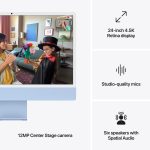
🖥️ 24-inch 4.5K Retina Display — 500 Nits, True Tone, 1 Billion Colours The iMac's 4480×2520 display at 218 PPI is simply one of the best monitors you can buy — at any price. Colours are vivid and accurate, text is razor sharp, and True Tone automatically adjusts the white point based on ambient lighting so the screen always looks natural. At 500 nits it is comfortably bright enough for any office or home environment. Whether you are editing photos, watching films, designing a presentation, or just browsing the web, every pixel is defined with remarkable clarity. You would pay more for a standalone 4K monitor of similar quality — and the iMac includes the entire computer behind it. | ⚡ Apple M4 Chip — Up to 1.7× Faster than M1, 120GB/s Memory Bandwidth The M4 brings the same chip architecture that powers the MacBook Pro and Mac mini to the iMac. With up to 10 CPU cores, a 16-core Neural Engine, and 120GB/s of unified memory bandwidth, it is dramatically faster than the M1 and M2 iMacs it replaces. Office work, photo editing, video calls, coding, light video editing — the M4 handles everything you throw at it without breaking a sweat. Apple Intelligence features including Writing Tools, Smart Reply, and on-device AI are all available. And because it is an Apple chip, performance on battery is identical to performance on mains power. |
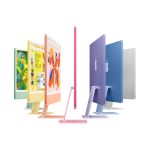
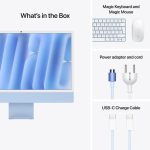
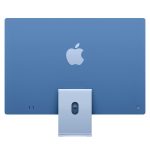
🎨 Seven Vibrant Colours — The Most Colourful Desktop Apple Has Ever Made The iMac M4 is available in Blue, Green, Pink, Purple, Orange, Yellow, and Silver — each with a two-tone finish where the front is a soft pastel and the back is a richer, deeper version of the same colour. Your Magic Keyboard, Magic Mouse, and woven charging cable all arrive in a matching colour. It is the most considered, cohesive product design Apple has ever made for the desktop. In any home office or workspace in Bangladesh, the iMac M4 is not just a computer — it is a statement piece that complements the room. | 📷 12MP Center Stage Camera + Three-Mic Array + Six-Speaker Spatial Audio The iMac M4 has the best built-in camera, microphone, and speaker system of any desktop Apple has ever made. The 12MP Center Stage camera automatically keeps you in frame during video calls — and Desk View provides a top-down view of your workspace for teaching, tutorials, and presentations. The three studio-quality microphones use beamforming to isolate your voice from background noise. The six-speaker system with force-cancelling woofers produces room-filling Spatial Audio with Dolby Atmos support — the kind of audio quality that would cost significantly more from a standalone speaker system. |
🔌 Thunderbolt 4 Ports + Ethernet on Power Brick — Remarkably Clean Desk Setup The 4-port iMac M4 model gives you four Thunderbolt 4 ports (up to 40Gb/s each) plus two USB 3 Type-A ports on the rear — all the connectivity you need for external drives, displays up to 6K, and accessories. Gigabit Ethernet is built into the magnetic power connector on the back of the display, routing the cable away from your desk and keeping everything spotless. The result is a desk setup where only the power cable (and Ethernet if used) are visible. No separate tower, no cable jungle — just the display, the keyboard, and the mouse. | 🤖 Apple Intelligence + iPhone Mirroring + macOS Sequoia The iMac M4 runs macOS Sequoia with Apple Intelligence built in — Writing Tools for drafting and rewriting text, Smart Reply in Mail, Image Clean Up in Photos, and on-device AI that keeps your data private. iPhone Mirroring lets you view and control your iPhone directly from the iMac screen — copy something on iPhone, paste it on Mac. Universal Clipboard, Handoff, and AirDrop all work seamlessly between Apple devices. If you already have an iPhone, the iMac makes every part of your digital life flow together more naturally than any other desktop platform. |
⚡ iMac M4 — Performance at a Glance
| 1.7× faster than M1 iMac | 4.5K Retina display · 218 PPI | 16-core Neural Engine for AI | 11.5mm thin — thinner than most phones |
🔧 Full Technical Specifications
| Chip & Performance | |
|---|---|
| Chip | Apple M4 (3nm second-generation) |
| CPU — Base Model | 8-core (4 performance + 4 efficiency) · 4.4GHz peak |
| CPU — Upgraded Models | 10-core (4 performance + 6 efficiency) · 4.4GHz peak |
| GPU — Base Model | 8-core GPU |
| GPU — Upgraded Models | 10-core GPU |
| Neural Engine | 16-core · 38 TOPS |
| Memory Bandwidth | 120GB/s |
| Memory & Storage | |
|---|---|
| Unified Memory | 16GB (base) · 24GB (upgraded configs) |
| SSD Storage | 256GB · 512GB · 1TB · 2TB (configurable at purchase) |
| Upgradeable? | ⚠️ No — RAM and storage are fixed at purchase. Choose carefully. |
| Display | |
|---|---|
| Display Type | 24-inch 4.5K Retina · LED-backlit IPS · True Tone |
| Resolution | 4480 × 2520 at 218 PPI |
| Brightness | 500 nits |
| Colour | 1 billion colours · P3 wide colour gamut |
| Nano-texture Glass | Optional on 4-port models (reduces reflections) |
| External Display Support | 2-port model: 1 external display up to 6K · 4-port model: 2 displays up to 6K each or 1 display up to 8K |
| Ports & Connectivity | |
|---|---|
| Thunderbolt Ports | 2-port model: 2× Thunderbolt / USB 4 (40Gb/s) · 4-port model: 4× Thunderbolt 4 (40Gb/s) |
| USB 3 Type-A | 4-port model only: 2× USB 3 Type-A (5Gb/s) on rear |
| 3.5mm Headphone Jack | Left side of display · supports high-impedance headphones |
| Ethernet | Gigabit on power brick (standard) · 2.5Gb Ethernet upgrade available on 4-port models |
| Wi-Fi | Wi-Fi 6E (802.11ax) — 2.4GHz, 5GHz, 6GHz |
| Bluetooth | Bluetooth 5.3 |
| Camera, Audio & Accessories | |
|---|---|
| Camera | 12MP Center Stage · 1080p video · Desk View |
| Microphones | Three-mic studio-quality array with directional beamforming |
| Speakers | Six-speaker system with force-cancelling woofers · Spatial Audio · Dolby Atmos |
| Keyboard (Base) | Magic Keyboard with Lock Key (no Touch ID) — colour-matched |
| Keyboard (Upgraded) | Magic Keyboard with Touch ID — colour-matched · Top model adds numeric keypad |
| Mouse | Magic Mouse — colour-matched (Magic Trackpad available at extra cost) |
| Design & Physical | |
|---|---|
| Height (with stand) | 46.1 cm |
| Width | 54.7 cm |
| Depth (with stand) | 14.7 cm |
| Body Thickness | 11.5 mm (display section) |
| Weight | 4.48 kg (with stand) |
| Colours | Blue · Green · Pink · Purple · Orange · Yellow · Silver |
| Power Supply | 143W (base) or 143W with MagSafe-style magnetic connector (upgraded models) |
| Operating System | macOS Sequoia (upgradeable to macOS Tahoe) |
| SKU — Base (2-port) | MWUF3LL/A (Blue) and equivalents per colour |
| SKU — Upgraded (4-port) | MWV13LL/A (Blue) and equivalents per colour and configuration |
📊 iMac M4 vs iMac M3 — What Actually Changed?
| Feature | iMac M4 (2024) ✦ New | iMac M3 (2023) |
|---|---|---|
| Chip | M4 — 3nm Gen 2 | M3 — 3nm Gen 1 |
| Memory Bandwidth | 120 GB/s 🔋 | 100 GB/s |
| Base RAM | 16GB standard ✅ | 8GB (needed upgrade for 16GB) |
| Camera | 12MP Center Stage + Desk View | 12MP (no Desk View) |
| External Display (4-port) | 2× 6K or 1× 8K | 2× 6K only |
| Colours | 7 colours — more vibrant back | 7 colours (different set, less vibrant) |
| Apple Intelligence | ✅ Full Apple Intelligence | ✅ Supported |
| Display | Same 4.5K 500 nits True Tone | Same 4.5K 500 nits True Tone |
| Design & Size | Identical — 11.5mm, same stand | Identical form factor |
| Verdict | 🏆 Buy M4 — 16GB base RAM alone justifies it | Good deal if discounted |
🎯 Is the iMac M4 the Right Computer for You?
✅ Get the iMac M4 If... ✓ You want a beautiful, fast all-in-one desktop that complements your home or office space ✓ You are a student, teacher, writer, or business professional who does most work at a desk ✓ You already have an iPhone and want seamless continuity between all your Apple devices ✓ You do video calls frequently and want the best built-in camera and microphone on any desktop ✓ You are a photo or video editor who needs a colour-accurate display and fast chip at a reasonable price ✓ You want a clean, cable-free desk setup with everything — computer, display, speakers — in one unit ✓ You are switching from Windows and want the simplest, most integrated Mac experience available | 🤔 Consider Something Else If... → You need to carry your computer — the iMac is a desktop and cannot leave your desk → You want to upgrade components later — RAM and SSD are fixed at purchase, not user-upgradeable → You do extremely heavy workloads like 3D rendering, machine learning, or professional 8K video — consider Mac Studio M4 Max instead → You already own a high-quality external monitor and just want the computer — Mac mini M4 is a better fit → Budget is very tight — the MacBook Neo (A18 Pro) starts significantly lower if portability and price are priorities Not sure? Call +8801714039409 — we'll give you a straight answer in 2 minutes. |
📊 Mac Price List in Bangladesh 2024/2025
Current Mac prices at Gadget BD — call for the latest confirmed figures.
| Mac Model | Chip | RAM / Storage | Link |
|---|---|---|---|
| iMac 24" M4 YOU ARE HERE | M4 | 16–24GB / 256GB–2TB | View → |
| Mac mini M4 | M4 / M4 Pro | 16GB+ / 256GB+ | View → |
| MacBook Air 13" M5 | M5 | 16–32GB / 512GB–4TB | View → |
| MacBook Air 15" M5 | M5 | 16–32GB / 512GB–4TB | View → |
| MacBook Pro 14" M5 | M5 | 16–32GB / 512GB–4TB | View → |
| Mac Studio M4 Max | M4 Max / M4 Ultra | 36GB+ / 512GB+ | View → |
Prices updated regularly. Call +8801714039409 for the latest iMac M4 price in Bangladesh. Browse all Macs at Gadget BD →
TRUSTED SINCE 2013
🇧🇩 Why Buy from Gadget BD?
Bangladesh's most trusted Apple retailer — two showroom floors at Bashundhara City, Dhaka. Over a decade of helping customers across the country get the right Mac for their work and life.
🏪 Physical Showroom | ✅ Genuine Products | 🚚 Nationwide Delivery | 💳 EMI Available |
❓ iMac M4 — Frequently Asked Questions
The iMac M4 starts at US$1,299 for the base 8-core / 16GB / 256GB model. In Bangladesh, prices are higher due to import duties and taxes. For the exact, up-to-date iMac M4 price in Bangladesh, call Gadget BD at +8801714039409 or visit our Bashundhara City showroom. We always have the latest prices.
The 2-port base model has an 8-core CPU, 8-core GPU, 2 Thunderbolt ports, and a Magic Keyboard without Touch ID. The 4-port models have a 10-core CPU, 10-core GPU, 4 Thunderbolt 4 ports, 2 additional USB 3 Type-A ports, a Magic Keyboard with Touch ID, better external display support (up to 8K), and the optional nano-texture glass. For most users the 4-port model is worth the upgrade — especially for Touch ID and the extra ports.
No. The iMac M4 uses Apple's Unified Memory architecture where memory and SSD are soldered directly onto the M4 chip package — they cannot be upgraded after purchase. This is why choosing the right configuration at the time of purchase is critical. For most users, 16GB is sufficient. If you edit 4K video, run virtual machines, or use heavy creative software, consider 24GB. For storage, 512GB is a safer long-term choice over 256GB.
A comparable Windows all-in-one with a 4K display, equivalent CPU performance, and built-in camera/microphone of similar quality would cost similar or more — without matching the iMac's display quality, software ecosystem, or design. The iMac M4 also includes a Magic Keyboard and Magic Mouse in the box. The main advantage of Windows desktops is upgradability — you can add RAM and storage later. If that matters to you, a separate Windows desktop is worth considering. But for simplicity, design, and the Apple ecosystem, the iMac M4 has no peer.
16GB is genuinely enough for the vast majority of iMac users — web browsing, Office, email, FaceTime, Lightroom, casual video editing, and even coding. Apple's Unified Memory architecture is far more efficient than traditional RAM, and macOS Sequoia manages memory extremely well. Go with 24GB if you regularly run Final Cut Pro with 4K footage, use multiple virtual machines, work in Affinity Publisher or InDesign with large files simultaneously, or plan to use the iMac as a long-term workstation for 5+ years.
Absolutely. The iMac M4 is an excellent choice for students who do most of their work at a desk — writing assignments, research, presentations, video calls, and multimedia. The 4.5K display is superb for long study sessions. It is also ideal for teachers, freelancers, small business owners, and anyone who wants a complete, beautiful computer setup in one unit. If you need portability for university or travel, consider the MacBook Air M5 instead — the iMac is strictly for desk use.
Yes. The 2-port iMac M4 supports one external display at up to 6K resolution via Thunderbolt. The 4-port model supports two external displays at up to 6K each, or one display at up to 8K. This means you can run a dual-monitor setup — the built-in 4.5K screen plus an external display — on the 4-port model. This is ideal for designers, accountants, programmers, and anyone who works with multiple applications simultaneously.
🇧🇩 iMac M4 সম্পর্কে বাংলায় সাধারণ প্রশ্নের উত্তর
প্রশ্ন ১: বাংলাদেশে iMac M4 এর দাম কত?
iMac M4 এর বাংলাদেশে দাম নির্ভর করে কনফিগারেশনের উপর। বেস মডেল (8-core CPU, 16GB RAM, 256GB SSD) সবচেয়ে সাশ্রয়ী। আপডেটেড দাম জানতে গ্যাজেট বিডিতে কল করুন +8801714039409 অথবা বসুন্ধরা সিটি শোরুমে আসুন।
প্রশ্ন ২: iMac M4 কি বাংলাদেশে পাওয়া যায়?
হ্যাঁ, Apple iMac M4 বাংলাদেশে গ্যাজেট বিডিতে পাওয়া যায়। Blue, Green, Pink, Purple, Orange, Yellow এবং Silver — সাতটি রঙে পাওয়া যাচ্ছে। অনলাইনে অর্ডার করলে ঢাকায় ১-২ দিন এবং সারা দেশে ৩-৫ দিনে ডেলিভারি পাওয়া যায়।
প্রশ্ন ৩: iMac M4 নাকি MacBook Air M5 — কোনটি নেওয়া উচিত?
যদি আপনি সবসময় একটি নির্দিষ্ট জায়গায় বসে কাজ করেন এবং বড় স্ক্রিন চান, তাহলে iMac M4 আদর্শ। কিন্তু যদি ক্লাসে, অফিসে বা ভ্রমণে নিয়ে যাওয়ার প্রয়োজন হয়, তাহলে MacBook Air M5 নেওয়া ভালো। সিদ্ধান্ত নিতে সমস্যা হলে কল করুন — আমরা সাহায্য করব।
প্রশ্ন ৪: iMac M4 কি ভিডিও এডিটিং বা গ্রাফিক ডিজাইনের জন্য ভালো?
হ্যাঁ, iMac M4 ফটো এডিটিং, লাইটরুম, ক্যাপচার ওয়ান, অ্যাফিনিটি ডিজাইনার, এডোবি ক্রিয়েটিভ ক্লাউড এবং ফাইনাল কাট প্রো-র জন্য চমৎকার। 4.5K Retina ডিসপ্লে কালার-ক্রিটিকাল কাজের জন্য অত্যন্ত উপযুক্ত। ভারী 4K ভিডিও প্রজেক্টের জন্য 24GB RAM কনফিগারেশন বেছে নেওয়া ভালো।
প্রশ্ন ৫: গ্যাজেট বিডি থেকে iMac M4 কিনলে কী ওয়ারেন্টি পাওয়া যায়?
গ্যাজেট বিডি থেকে কেনা সমস্ত Apple পণ্যে অফিসিয়াল ১ বছরের Apple ওয়ারেন্টি পাওয়া যায়। পেমেন্ট করা যায় bKash, Nagad, ক্রেডিট কার্ড, ক্যাশ এবং ব্যাংক EMI-তে। বসুন্ধরা সিটি, লেভেল ৫ ও ৬, শপ নম্বর #84 ও #115।